Appearance
Step 8: The Ladder Method
Fresh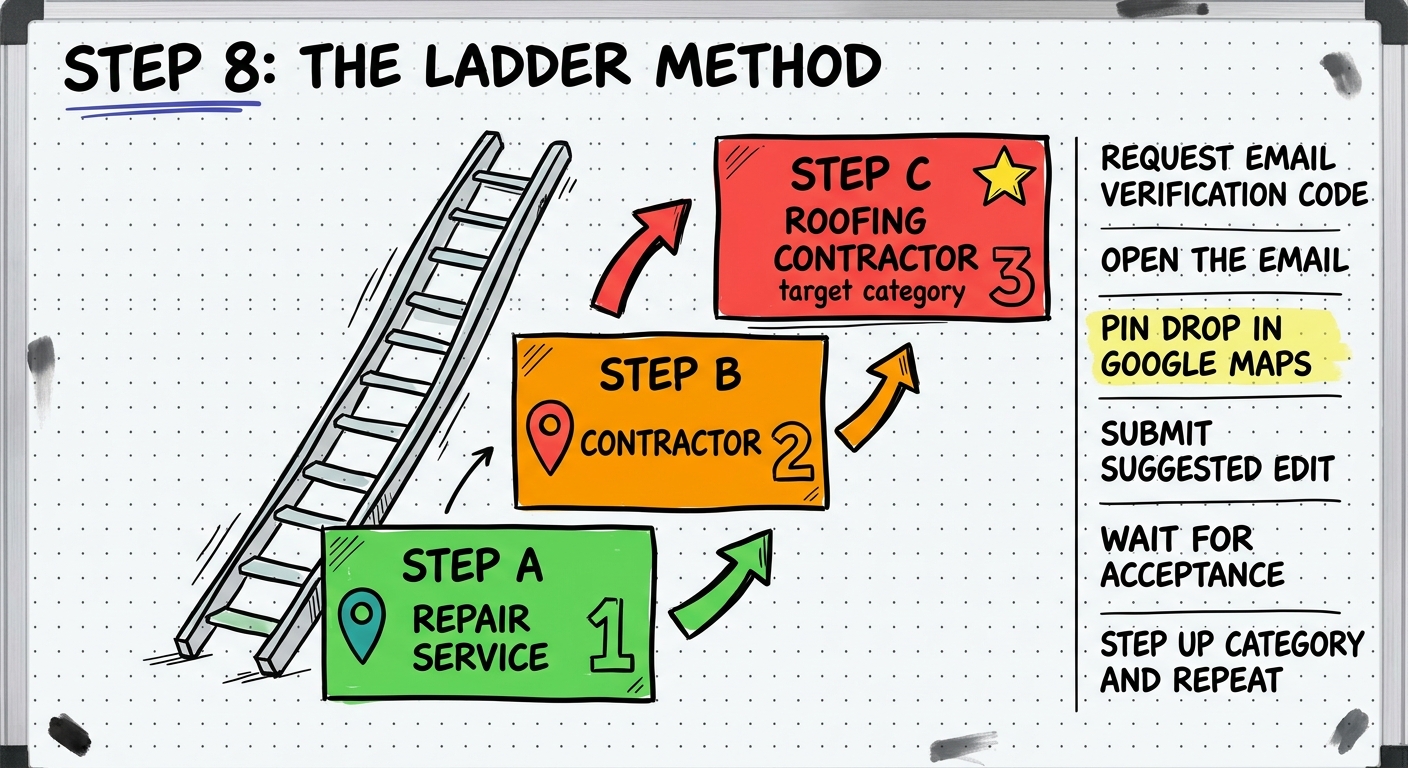
Overview
This is the core technique — the pin drop hybrid method. You ladder (or step) through progressively harder GBP categories using Google Maps pin drops, then verify with your email code to go live.
Procedure
1. Create the Listing with an Easy Category
- Go to business.google.com
- Enter your business name and click Continue
- Select Local Store
- Set the category to your starting category (e.g., Repair Service)
- Enter your address — confirm no conflicting listings exist there
- Enter your phone number and website URL
- Click Next and Continue
2. Request Email Verification
- Select email verification (more stable than phone verification)
- Go to SiteGround webmail and log into your domain email (e.g.,
contact@) - Wait for the verification email to arrive
- Open the verification email — do NOT enter the code yet
Open the Email First
Google may track whether you opened the verification email. Always open it before proceeding. Do not just grab the code from the subject line.
3. Fill Out the Business Profile
While the verification is pending, complete the profile:
Hours:
- Set to Open with main hours
- Use simple hours like 9 AM to 5 PM
Business Description:
- Go to ChatGPT and use a prompt like: "Write a 750 character business description for a [category] company named [Name], located in [City], [State], serving the [area]. Include residential and commercial services and all common services."
- Paste the description into the profile (aim for around 750 characters)
4. Pin Drop Step 1 — Easy Category
This is the critical move. Go to maps.google.com:
- Search for your business address
- Click "Add a Missing Place"
- Fill out the form:
- Name: Use a shortened name (e.g., just "Panara" — not the full business name yet)
- Category: Your starting category (e.g., Repair Service)
- Hours: 9 AM to 5 PM (must match the dashboard)
- Phone Number: Same as the profile
- Website URL: Same as the profile
- Click Submit
Timing is Critical
Do the pin drop AFTER the verification code email has been requested. Never do it before requesting the code.
Keep Working
Do not wait around for the edit decision. Go work on your next listing. Come back and check later.
5. Wait for Edit Decision
One of three things will happen:
| Result | Action |
|---|---|
| Accepted | Move to the next ladder step |
| Not Accepted | Still move to the next step — it is okay |
| Pending | Wait and check back later |
6. Pin Drop Step 2 — Intermediate Category
- Go back to Google Maps
- Search the address again
- Do another "Add a Missing Place" pin drop
- Same information, but change:
- Category: Step up to an intermediate category (e.g., Contractor)
- Name: Keep the same shortened name
- Phone and Website: Must still match
- Click Submit
7. Pin Drop Step 3 — Target Category
- Do another pin drop with:
- Name: Now use more of the real name (e.g., "Panara Roofing")
- Category: Your target category (e.g., Roofing Contractor)
- Phone and Website: Same as always
- Click Submit
Full Name Later
Sometimes it is easier to use a partial name during laddering and add the full name afterward. It is a feel thing — experiment with what works.
8. Handling Pending Edits
If edits get stuck in Pending:
- Create a new email address in SiteGround (e.g.,
jason@yourdomain.shop) - Start a new verification request with the new email
- Try the pin drop again with the full business name and target category
- Fill out all profile information before submitting — incomplete profiles get stuck more often
9. Verify and Go Live
- Go back to your email inbox
- Grab the verification code
- Enter it in the GBP dashboard
- Your listing should go live
Success Rate
9 out of 10 times — if not 10 out of 10 — this method works. The key is matching phone number and website URL across every pin drop.
10. Merge Duplicate Listings
During the laddering process, you may create multiple pin drops (Repair Service, Contractor, Roofing Contractor). After going live:
- Search for your address in Google Maps
- Find the duplicate listings
- Use Google's merge/report features to consolidate them into your final verified listing
The Ladder Path
Repair Service  →  Contractor  →  Roofing Contractor
    (easy)           (medium)         (target)
Key Principles
| Principle | Details |
|---|---|
| Same phone number | Must match across all pin drops and the dashboard |
| Same website URL | Must match across all pin drops and the dashboard |
| Open verification emails | Google may track whether you opened them |
| Fresh or clean aged Gmails | No prior GBP or Maps activity |
| Do not wait around | Work on other listings while edits process |
| Trial and error | Some categories need different starting points |
Tools Used
| Tool | Purpose |
|---|---|
| Google Business Profile | Listing creation and verification |
| Google Maps | Pin drop submissions ("Add a Missing Place") |
| ChatGPT | Business description generation |
| SiteGround | Email management for verification |
Output
At the end of this step you should have:
- A verified, live Google Business Profile in your target category
- The listing visible in Google Maps
- Duplicate listings merged
Previous Step: Step 7: Category Framing
You did it. The listing is live. Now optimize, add photos, get reviews, and build out the real website.